REVIEW · TOKYO
Japan: eSIM with Unlimited Local 4G/5G Data
Book on GetYourGuide →Operated by LINK KOREA · Bookable on GetYourGuide
Japan has a way of making you need your phone constantly. An eSIM cuts the hassle down fast.
What I like most is the unlimited local 5G/4G data on Japan’s KDDI(au) network, so maps, rides, translations, and messaging all have room to breathe. The other win is the workflow: you pick Ultra or Lite, get an eSIM QR code, scan it, and get connected without hunting for a physical SIM card.
One thing to watch: the QR code on the voucher you see first is not the eSIM QR code. The actual eSIM QR code arrives by email later, and if you mix those up, you’ll think it’s broken.
In This Review
- Key takeaways before you buy
- Why KDDI au unlimited data feels worth it in Japan
- A small reality check
- Ultra vs Lite: speed limits and which plan fits your style
- Ultra: unthrottled unlimited (fast, flexible)
- Lite: unlimited, but capped (usually plenty)
- Hotspot note you should plan around
- The QR code reality: how to avoid setup frustration
- Pre-trip checklist (do this before you land)
- If the QR code fails
- Activation timing in Japan: what happens after you arrive
- Plan durations and how days get counted
- eSIM QR code validity window
- Daily use: unlimited data, 5G/4G switching, and real-world expectations
- What to expect indoors and underground
- No voice or SMS: plan your communication
- Hotspot sharing: when it works well (and what to watch)
- Price and value: how $10 stacks up for your trip length
- When this is a great deal
- When you might reconsider
- The real “tour route” of this eSIM: step-by-step flow
- Stop 1: Pick Ultra or Lite based on how you use data
- Stop 2: Wait for the correct QR code email
- Stop 3: Confirm eSIM compatibility and unlocked phone
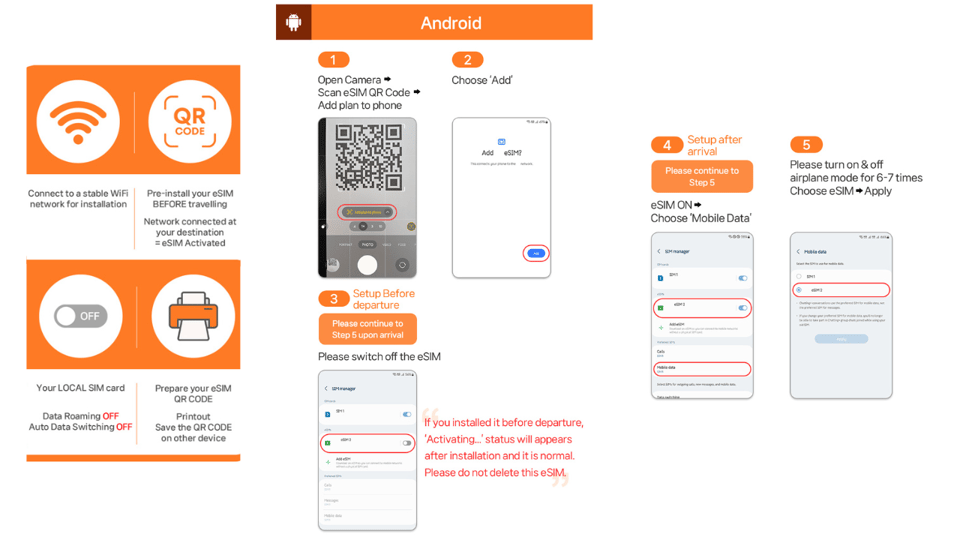
- Stop 4: Add the eSIM to your phone
- Stop 5: Land in Japan and connect to KDDI(au)
- Stop 6: Use data and accept that 5G can drop
- Who should book this eSIM (and who should skip it)
- Should you book this Japan eSIM?
- FAQ
- When will I receive the QR code to install the eSIM?
- What is the difference between the Ultra and Lite plans?
- Does this eSIM include voice calls and SMS?
- Can I use hotspot / tethering with this eSIM?
- What should I do if I see QR code is invalid?
- When does the eSIM start working in Japan?
Key takeaways before you buy
- Ultra vs Lite is really about speed behavior: Ultra is unlimited with no throttling; Lite caps speed at 10Mbps.
- The right QR code matters: the voucher QR isn’t the one you install—your eSIM QR comes by email 1 day before.
- eSIM activation happens after you arrive in Japan: plan around getting your first connection in Japan, not before.
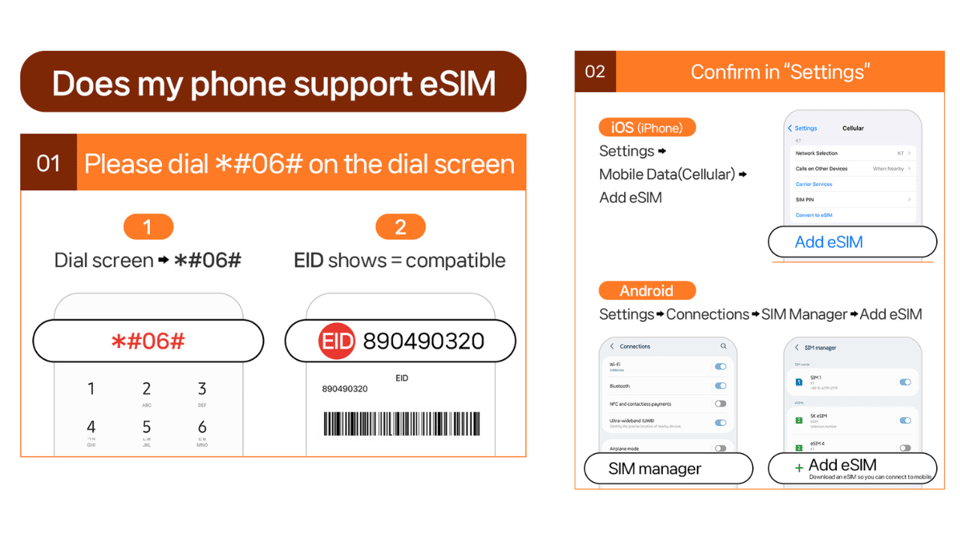
- Check eSIM compatibility first: confirm your phone shows EID with #06#.
- Hotspot works, with limits: tethering is included, but expect restrictions depending on the plan.
- 5G can drop to 4G indoors or underground: that’s normal, and it’s stated right in the product notes.
Why KDDI au unlimited data feels worth it in Japan
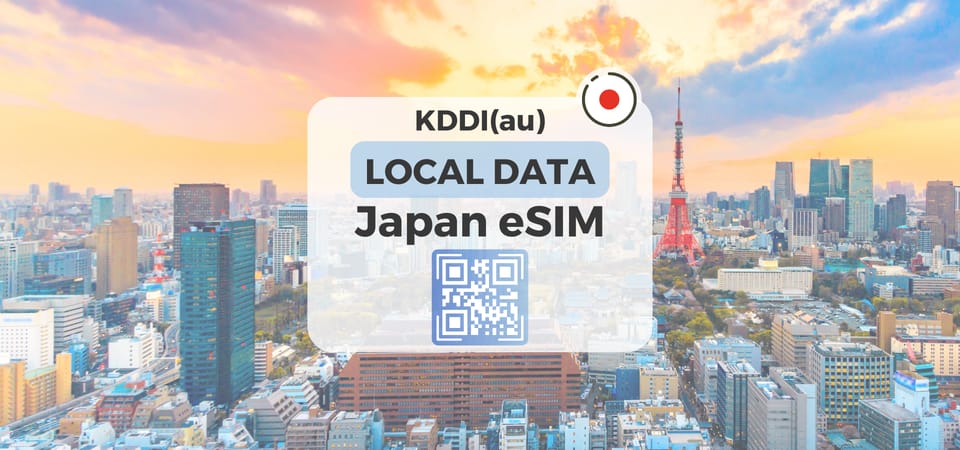
For a trip around Honshu, you’re usually juggling trains, walking routes, restaurant hours, and the constant need to look things up. This eSIM is built for that pace: unlimited local data across 5G and 4G coverage in Japan.
The big practical advantage is you don’t have to coordinate a kiosk, find a store, or risk buying the wrong physical SIM. If your phone supports eSIM and is unlocked, you can handle the setup from wherever you are and focus on day-one logistics in Japan.
Also, this is local data, not a “works sometimes” roaming setup. The provider specifies KDDI(au) coverage in Japan, which is exactly what you want for navigation and day-to-day apps.
You can also read our reviews of more tours and experiences in Tokyo.



A small reality check
Japan’s signal isn’t the same everywhere. The product notes say that 5G may switch to 4G indoors, underground, or in crowded places. That’s not a failure; it’s a radio-world thing. If your priority is steady maps and messaging, 4G still usually does the job.
Ultra vs Lite: speed limits and which plan fits your style
You get two plan options, and choosing correctly is where you get real value out of that $10-per-person pricing.
Ultra: unthrottled unlimited (fast, flexible)
- Data: Unlimited 5G/4G local data with no throttling
- Speed: Stays unthrottled according to the plan
- Voice & SMS: Not included (N/A)
Pick Ultra if you:
- Stream video on the go
- Use lots of maps in real time
- Tether a device often and don’t want speed surprises
Lite: unlimited, but capped (usually plenty)
- Data: Unlimited 5G/4G local data with max data speed 10Mbps
- Duration range: 3 to 10 days
- Voice & SMS: Not included (N/A)
Pick Lite if you:
- Mostly use maps, messaging apps, and normal browsing
- Don’t binge-stream while walking through stations
- Want an easier fit for shorter trips





Hotspot note you should plan around
Both plans include hotspot sharing (tethering) with limitations depending on the selected plan. The exact tether limits aren’t spelled out in the details you provided, so I’d treat tethering as “yes, but expect restrictions.” If you’re relying on another phone or tablet for work, Ultra is the safer bet.
The QR code reality: how to avoid setup frustration
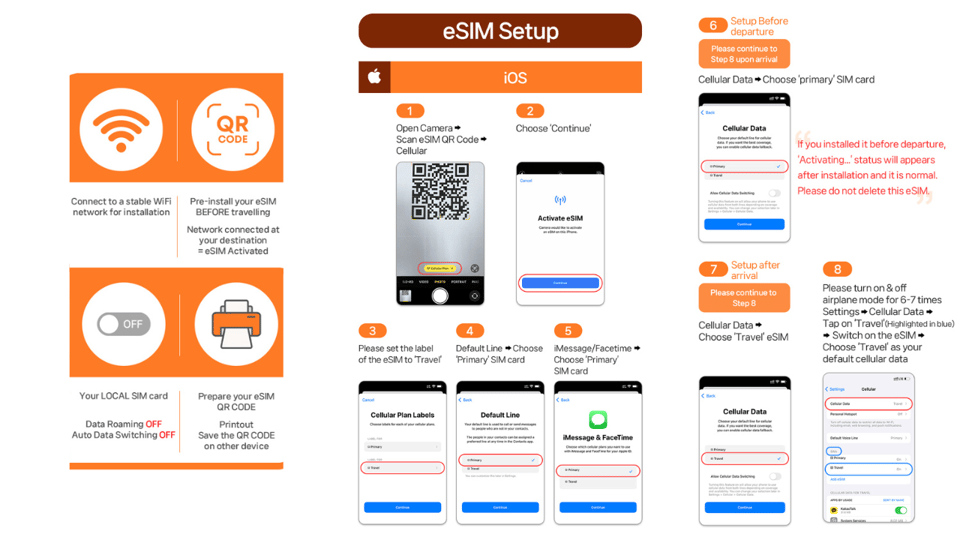
This part is where most problems happen, and it’s clearly called out: the QR code in the initial voucher is not the eSIM QR code.
Here’s the sequence you should follow:
- You purchase the activity.
- An eSIM QR code is delivered to your email 1 day before the activity date.
- You install that eSIM QR code on your phone.
If you try to scan the voucher QR code thinking it’s ready to install, you may get errors like QR code is invalid.
Pre-trip checklist (do this before you land)
Before you buy, confirm your phone supports eSIM:
- Dial #06# and check whether EID shows.
- If EID does not show, your device is likely incompatible with eSIM.
- Make sure your phone is unlocked for a foreign SIM/eSIM.
Then, when your email arrives with the eSIM QR code:
- Check your inbox and any spam folder.
- Don’t leave installation until the last second.
If the QR code fails
If you see QR code invalid or similar:
- On iOS, go to Settings > Cellular (iOS) and look for a new eSIM.
- On Android, go to Settings > Connections > SIM Manager (Android) and check for a new eSIM.
If you still can’t get it working, contact the supplier using the email or WhatsApp instructions provided with the support info. The goal is to get the eSIM successfully added on your phone, even if activation comes later.
Activation timing in Japan: what happens after you arrive
One key detail that affects your data math: the eSIM connects to the local network after you arrive in Japan.
So the practical rule for planning is:
- Don’t assume it fully counts from the moment you install the QR code at home.
- The plan duration is tied to when you first connect to the KDDI(au) network in Japan.
Plan durations and how days get counted
The specs say the plan duration runs 3 to 30 days depending on option. For Lite, usage calculation is calendar-day based, starting from the first connection to the KDDI(au) network in Japan.
Example given:
- If activation happens at 10 PM Japan time, that counts as 1 full day by midnight.
That’s a helpful warning if you land late at night. You might gain a “full day” unexpectedly if you connect close to midnight.
eSIM QR code validity window
You also need to install and activate within 30 days of purchase. Even though the QR code arrives by email close to your activity date, don’t ignore the clock after that.
Daily use: unlimited data, 5G/4G switching, and real-world expectations
In practice, this kind of eSIM is all about reliability: will it keep up with your normal phone life?
The product notes plus the reported experience point to a solid setup story: easy installation, and a signal that stays available even in places where many networks struggle, like subways. That matters because Japan’s travel rhythm includes underground sections and dense stations.
What to expect indoors and underground
You should expect 5G to sometimes switch to 4G when you’re:
- Indoors
- Underground
- In crowded areas
Your phone will usually handle that switch automatically. From a traveler’s perspective, the key is that you’re not cut off; you just drop to 4G until conditions improve.
No voice or SMS: plan your communication
This plan is data-only:
- Voice calls: N/A
- SMS messaging: N/A
If you rely on SMS for logins or two-factor authentication, you’ll want to double-check your setup before you fly. Keep an eye on which accounts need SMS codes versus app-based authentication.
Hotspot sharing: when it works well (and what to watch)
Hotspot is included, with limitations depending on your plan. That’s useful if:
- You bring a second phone
- You need connectivity for a tablet
- You’re traveling with someone who forgot their eSIM or SIM
But hotspot can also shift your experience fast:
- Tethered devices may not feel as fast as your main phone, especially on the Lite plan’s 10Mbps cap.
- Battery drain becomes a factor when you tether continuously.
If you’re planning to use hotspot for long stretches—commuting days, road trips, or work sessions—Ultra gives you the most breathing room based on the unthrottled design.
Price and value: how $10 stacks up for your trip length
On paper, $10 per person sounds straightforward. The value depends on which duration you choose and how heavy your data use is.
When this is a great deal
This is a good fit if you:
- Want an easy, QR-based setup with no store stop
- Need reliable navigation and translation
- Plan to use data daily without trying to micromanage usage
When you might reconsider
You should think carefully if:
- Your trip is long and you expect to need maximum speed for streaming through hotspot
- You’re sensitive to the Lite 10Mbps cap
- You need voice/SMS (since it’s not included)
For many typical sightseeing trips, both plans can be enough. The decision point is speed expectations (Ultra) versus cost discipline (Lite).
Also note: refunds are not accepted once the eSIM QR code has been sent. So make sure your phone is compatible and unlocked before you count on this plan.
The real “tour route” of this eSIM: step-by-step flow
Since this isn’t a guided city route, the “itinerary” is the setup journey that determines whether your trip feels smooth.
Stop 1: Pick Ultra or Lite based on how you use data
- Ultra if you want unthrottled unlimited behavior
- Lite if you’re fine with a 10Mbps cap and mainly use the internet normally
Stop 2: Wait for the correct QR code email
The voucher QR isn’t it. Your install QR arrives by email 1 day before your activity date.
Stop 3: Confirm eSIM compatibility and unlocked phone
Use *#06# to check for EID. If you don’t see EID, don’t waste time trying to install.
Stop 4: Add the eSIM to your phone
If you hit QR problems, check SIM Manager or Cellular settings for the new eSIM profile.
Stop 5: Land in Japan and connect to KDDI(au)
Activation is stated to happen after arrival, and the “day counting” logic starts from your first connection time.
Stop 6: Use data and accept that 5G can drop
Your phone may switch 5G to 4G depending on location. That’s expected and should keep you connected.
Who should book this eSIM (and who should skip it)
You’ll probably be happy with this Japan eSIM if you:
- Want internet for navigation, messaging apps, and daily searches
- Prefer the convenience of QR installation over buying a physical SIM
- Are traveling around Honshu and want dependable coverage on KDDI(au)
You might want to look elsewhere if you:
- Need voice calling or SMS as part of your plan
- Have an incompatible phone that doesn’t show EID
- Depend on an exact speed for hotspot-heavy work and won’t tolerate any throttling or tether limits
Should you book this Japan eSIM?
If your phone supports eSIM and you don’t need voice/SMS, this is an easy-value choice for Honshu travel. Ultra is the best pick if you stream, tether, or hate speed caps. Lite is a sensible option when your data use is mostly practical and you’d rather avoid overpaying for speed you won’t notice.
The only real “don’t trip over this” item is the QR code timing and identity: the voucher QR isn’t the install QR. Once you respect that, setup is fast and you get local 4G/5G right when you’re ready to move.
FAQ
When will I receive the QR code to install the eSIM?
The eSIM QR code is delivered to your email 1 day before the activity date. The QR code on the initial voucher is not the eSIM QR code.
What is the difference between the Ultra and Lite plans?
Ultra provides unlimited 5G/4G local data with no throttling. Lite also provides unlimited local data, but it has a maximum speed of 10Mbps.
Does this eSIM include voice calls and SMS?
No. The plan is data-only, and voice and SMS are listed as N/A.
Can I use hotspot / tethering with this eSIM?
Yes, hotspot sharing is included, but it comes with limitations depending on the selected plan.
What should I do if I see QR code is invalid?
Check your device settings for a newly added eSIM:
- iOS: Settings > Cellular (iOS)
- Android: Settings > Connections > SIM Manager (Android)
If it still fails, contact the supplier via the provided email or WhatsApp.
When does the eSIM start working in Japan?
The eSIM connects to the local network after you have arrived in Japan, and the plan usage/day count is based on your first connection time in Japan.